Boundary Conditions for Cells
Boundary conditions control what happens when a cell or chemical field attempts to cross the edge of the screen (simulation area).
Periodic
Much like classic arcade games, cells are allowed to “wrap around” and travel to the opposite side when they reach the edge of the screen.
Specify Boundary_x (left & right edges), Boundary_y (top & bottom edges), and/or Boundary_z (front & back edges) as Periodic to enable this behavior.
<Potts>
    <Dimensions x="101" y="101" z="1"/>
    <Boundary_x>Periodic</Boundary_x>
    <Boundary_y>Periodic</Boundary_y>
    <!-- Boundary_z>Periodic</Boundary_z --> <!--Use this for 3D-->
    <Anneal>0</Anneal>
    <Steps>10000</Steps>
    <FluctuationAmplitude>5</FluctuationAmplitude>
    <Flip2DimRatio>1</Flip2DimRatio>
    <NeighborOrder>2</NeighborOrder>
</Potts>
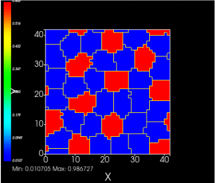
Periodic boundary conditions are useful for large areas of tissue wherein cells near the edges need to have neighbors. In this example, each red cell has approximately 7 neighbors. This allows us to produce a Delta-Notch Pattern.
NoFlux
This is the default, and it makes the simulation a finite space. Cells cannot cross the boundaries or otherwise interact with opposite edges.