Custom Simulation Visualization Settings
CompuCell3D can store simulation-specific visualization settings in two formats:
_settings.sqliteThe standard simulation settings database used by Player.
_custom_settings.xmlA portable XML representation of selected simulation settings. This file is convenient for version control, sharing settings with collaborators, and applying Player-generated visualization settings to Python-only simulations.
The XML file is optional. When it is present, its settings are loaded on top of
the normal default/global settings. In other words, values in
_custom_settings.xml override the values that would otherwise come from
default or global settings.
Where Settings Files Are Stored
For a regular .cc3d project, settings are stored in the project’s
Simulation folder:
MySimulation/
    MySimulation.cc3d
    Simulation/
        _settings.sqlite
        _custom_settings.xml
For Python-only simulations, place _custom_settings.xml in the same folder
as the Python script that starts the simulation. For example:
CompuCell3D/core/Demos/CC3DPy/scripts/
    SortingDemo.py
    ChemotaxisDemo.py
    _custom_settings.xml
When a Python-only simulation starts, CC3D checks the folder containing the
top-level Python script. If it finds _custom_settings.xml, it loads those
settings before visualization windows are created.
Selecting a Global Settings Directory Name
Player normally reads global settings from ~/.compucell3d_py3. You can
start Player with a different global settings folder name when you need an
isolated settings profile, for example when testing custom visualization
settings without modifying your normal Player configuration.
Use --global-settings-dir-name to choose the directory name under your home
directory:
compucell3d.command --global-settings-dir-name .cc3d_project_settings -i MySimulation.cc3d
On Windows, use compucell3d.bat:
compucell3d.bat --global-settings-dir-name .cc3d_project_settings -i MySimulation.cc3d
On Linux, use compucell3d.sh:
./compucell3d.sh --global-settings-dir-name .cc3d_project_settings -i MySimulation.cc3d
If CC3D is installed in a Python environment, you can also launch Player as a Python module:
python -m cc3d.player5 --global-settings-dir-name .cc3d_project_settings -i MySimulation.cc3d
In this example Player uses ~/.cc3d_project_settings for global settings.
The option expects a directory name, not a full filesystem path.
Note
The earlier option name --global-settings-dir has been replaced by
--global-settings-dir-name.
Info
When running Python-only simulations, you may need to update window
positions in _custom_settings.xml. Window positions generated by Player
and serialized to XML may not be directly compatible with windows created
by Python-only visualization. This is especially noticeable when moving
settings between different display setups, operating systems, or Player and
CC3DPy visualization.
Generating XML Settings from Player
The easiest way to create _custom_settings.xml is to use Player:
Open and start a
.cc3dsimulation in Player.Arrange graphics windows, choose fields, adjust scalar ranges, colors, and other visualization settings.
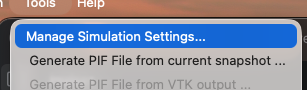
Open the
Toolsmenu and chooseManage Simulation Settings....
In the dialog, enable
XML Format.Click
Export Settings.
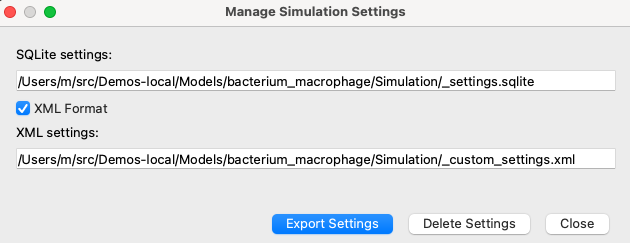
Player writes:
Simulation/_settings.sqliteSimulation/_custom_settings.xmlwhenXML Formatis enabled
To use these settings with a Python-only simulation, copy
_custom_settings.xml into the folder containing the Python script that
starts the simulation.
Basic XML Structure
The settings XML file has a root element named PlayerSettings and a
Settings section. Each individual setting is stored as a Setting
element with a name and type:
<?xml version='1.0' encoding='utf-8'?>
<PlayerSettings Version="1.0" Scope="Simulation">
    <Settings>
        <Setting Name="CellBordersOn" Type="bool">1</Setting>
        <Setting Name="BoundingBoxOn" Type="bool">1</Setting>
        <Setting Name="WindowColor" Type="color">#000000</Setting>
    </Settings>
</PlayerSettings>
Simple values appear as text inside the setting element. More complex values,
such as dictionaries and lists, are represented using nested Item elements.
Common scalar types include:
boolStored as
1for true and0for false.intandfloatNumeric values.
strText values.
colorHex RGB colors such as
#ff0000.pointandsizeTwo integer values separated by a comma. These are commonly used for window position and window size.
Cell Type Colors
The TypeColorMap setting controls colors assigned to cell type ids. It is a
dictionary where keys are integer cell type ids and values are colors:
<Setting Name="TypeColorMap" Type="dict">
    <Item Key="0" KeyType="int" Type="color">#000000</Item>
    <Item Key="1" KeyType="int" Type="color">#0000ff</Item>
    <Item Key="2" KeyType="int" Type="color">#008000</Item>
    <Item Key="3" KeyType="int" Type="color">#ff0000</Item>
</Setting>
Cell type id 0 is normally Medium. Other ids correspond to the cell types
declared in the simulation.
FieldParams
FieldParams stores visualization settings for scalar and vector fields.
Each entry is keyed by field name. For example, the following configures a
field named ATTR:
<Setting Name="FieldParams" Type="dict">
    <Item Key="ATTR" KeyType="str" Type="dict">
        <Item Key="ShowPlotAxes" KeyType="str" Type="bool">1</Item>
        <Item Key="MinRange" KeyType="str" Type="float">0.0</Item>
        <Item Key="MinRangeFixed" KeyType="str" Type="bool">1</Item>
        <Item Key="MaxRange" KeyType="str" Type="float">1.0</Item>
        <Item Key="MaxRangeFixed" KeyType="str" Type="bool">0</Item>
        <Item Key="NumberOfLegendBoxes" KeyType="str" Type="int">6</Item>
        <Item Key="NumberAccuracy" KeyType="str" Type="int">2</Item>
        <Item Key="LegendEnable" KeyType="str" Type="bool">1</Item>
        <Item Key="OverlayVectorsOn" KeyType="str" Type="bool">0</Item>
        <Item Key="ContoursOn" KeyType="str" Type="bool">0</Item>
        <Item Key="ScalarIsoValues" KeyType="str" Type="str" />
        <Item Key="NumberOfContourLines" KeyType="str" Type="int">9</Item>
        <Item Key="ArrowLength" KeyType="str" Type="int">1</Item>
        <Item Key="ScaleArrowsOn" KeyType="str" Type="bool">0</Item>
        <Item Key="FixedArrowColorOn" KeyType="str" Type="bool">0</Item>
        <Item Key="ArrowColor" KeyType="str" Type="color">#ffffff</Item>
    </Item>
</Setting>
Important entries include:
MinRangeandMaxRangeThe scalar range used for color mapping.
MinRangeFixedandMaxRangeFixedWhether the range endpoints are fixed by the user instead of being computed automatically from field values.
LegendEnableControls whether the color legend is displayed.
NumberOfLegendBoxesandNumberAccuracyControl legend appearance.
ContoursOnandNumberOfContourLinesControl contour display for scalar fields.
OverlayVectorsOn, ArrowLength, ScaleArrowsOn,
FixedArrowColorOn, and ArrowColor
Control vector overlay rendering when vector data are displayed.
If a field does not have an entry in FieldParams, CC3D uses default field
visualization settings for that field.
WindowsLayout
WindowsLayout stores graphics-window layout information. It is a dictionary
of windows. Each window entry contains the scene name, window size and
position, and VTK camera settings:
<Setting Name="WindowsLayout" Type="dict">
    <Item Key="0" KeyType="int" Type="dict">
        <Item Key="sceneName" KeyType="str" Type="str">Cell_Field</Item>
        <Item Key="winPosition" KeyType="str" Type="point">853,-744</Item>
        <Item Key="winSize" KeyType="str" Type="size">420,280</Item>
        <Item Key="cameraClippingRange" KeyType="str" Type="tuple">
            <Item Type="float">374.6708309603021</Item>
            <Item Type="float">432.84803158060953</Item>
        </Item>
        <Item Key="cameraFocalPoint" KeyType="str" Type="tuple">
            <Item Type="float">50.0</Item>
            <Item Type="float">50.0</Item>
            <Item Type="float">0.0</Item>
        </Item>
        <Item Key="cameraPosition" KeyType="str" Type="tuple">
            <Item Type="float">50.0</Item>
            <Item Type="float">50.0</Item>
            <Item Type="float">399.9995587361593</Item>
        </Item>
        <Item Key="cameraViewUp" KeyType="str" Type="tuple">
            <Item Type="float">0.0</Item>
            <Item Type="float">1.0</Item>
            <Item Type="float">0.0</Item>
        </Item>
    </Item>
</Setting>
The most important key is sceneName. CC3D uses it to match a saved layout
entry to a visualization. For example, if a Python-only simulation creates
windows for Cell_Field, F1, and F2, but WindowsLayout only
contains entries for Cell_Field and F2, then only those two windows get
their saved layout. The F1 window uses the normal default visualization
settings.
In Python-only simulations, CC3D currently restores the window position, window
size, and VTK camera settings from WindowsLayout. Projection-related
entries such as planeName, planePosition, and is3D may appear in the
XML file, but Python-only visualization may ignore them.
Editing XML by Hand
You can edit _custom_settings.xml in a text editor. This is useful for
small changes such as adjusting colors or scalar ranges. Keep the following in
mind:
Preserve the
Name,Type,Key, andKeyTypeattributes.Boolean values are
1and0.Colors use
#rrggbbformat.Dictionary entries use nested
Itemelements.XML overrides default/global settings only for settings present in the file.
For larger changes, it is usually easier to arrange windows and visualization
settings in Player and export a new XML file using Manage Simulation
Settings....
_custom_settings.xml example
<?xml version='1.0' encoding='utf-8'?>
<PlayerSettings Version="1.0" Scope="Simulation">
    <Settings>
        <Setting Name="ArrowColor" Type="color">#ffffff</Setting>
        <Setting Name="ArrowLength" Type="int">1</Setting>
        <Setting Name="AutomaticMovie" Type="bool">0</Setting>
        <Setting Name="Axes3DColor" Type="color">#ffffff</Setting>
        <Setting Name="AxesColor" Type="color">#ffffff</Setting>
        <Setting Name="BorderColor" Type="color">#ffff00</Setting>
        <Setting Name="BoundingBoxColor" Type="color">#ffffff</Setting>
        <Setting Name="BoundingBoxOn" Type="bool">1</Setting>
        <Setting Name="BrushColor" Type="color">#ffffff</Setting>
        <Setting Name="CC3DOutputOn" Type="bool">1</Setting>
        <Setting Name="CellBordersOn" Type="bool">1</Setting>
        <Setting Name="CellGlyphPhiRes" Type="int">2</Setting>
        <Setting Name="CellGlyphScale" Type="float">1.0</Setting>
        <Setting Name="CellGlyphScaleByVolumeOn" Type="bool">0</Setting>
        <Setting Name="CellGlyphThetaRes" Type="int">2</Setting>
        <Setting Name="CellGlyphsOn" Type="bool">0</Setting>
        <Setting Name="CellShellOptimization" Type="bool">0</Setting>
        <Setting Name="CellsOn" Type="bool">1</Setting>
        <Setting Name="ClusterBorderColor" Type="color">#0000ff</Setting>
        <Setting Name="ClusterBordersOn" Type="bool">0</Setting>
        <Setting Name="ConcentrationLimitsOn" Type="bool">1</Setting>
        <Setting Name="ContourColor" Type="color">#ffffff</Setting>
        <Setting Name="ContoursOn" Type="bool">0</Setting>
        <Setting Name="DisplayCellTypeColorMap" Type="bool">1</Setting>
        <Setting Name="DisplayUnits" Type="bool">1</Setting>
        <Setting Name="FPPLinksColor" Type="color">#ffffff</Setting>
        <Setting Name="FPPLinksColorOn" Type="bool">0</Setting>
        <Setting Name="FPPLinksOn" Type="bool">0</Setting>
        <Setting Name="FieldParams" Type="dict">
            <Item Key="ATTR" KeyType="str" Type="dict">
                <Item Key="ShowPlotAxes" KeyType="str" Type="bool">1</Item>
                <Item Key="MinRange" KeyType="str" Type="float">0.0</Item>
                <Item Key="MinRangeFixed" KeyType="str" Type="bool">1</Item>
                <Item Key="MaxRange" KeyType="str" Type="float">1.0</Item>
                <Item Key="MaxRangeFixed" KeyType="str" Type="bool">0</Item>
                <Item Key="NumberOfLegendBoxes" KeyType="str" Type="int">6</Item>
                <Item Key="NumberAccuracy" KeyType="str" Type="int">2</Item>
                <Item Key="LegendEnable" KeyType="str" Type="bool">1</Item>
                <Item Key="OverlayVectorsOn" KeyType="str" Type="bool">0</Item>
                <Item Key="ContoursOn" KeyType="str" Type="bool">0</Item>
                <Item Key="ScalarIsoValues" KeyType="str" Type="str" />
                <Item Key="NumberOfContourLines" KeyType="str" Type="int">9</Item>
                <Item Key="ArrowLength" KeyType="str" Type="int">1</Item>
                <Item Key="ScaleArrowsOn" KeyType="str" Type="bool">0</Item>
                <Item Key="FixedArrowColorOn" KeyType="str" Type="bool">0</Item>
                <Item Key="ArrowColor" KeyType="str" Type="color">#ffffff</Item>
            </Item>
        </Setting>
        <Setting Name="FixedArrowColorOn" Type="bool">0</Setting>
        <Setting Name="FrameRate" Type="int">7</Setting>
        <Setting Name="ImageOutputOn" Type="bool">1</Setting>
        <Setting Name="LatticeOutputOn" Type="bool">0</Setting>
        <Setting Name="LegendEnable" Type="bool">1</Setting>
        <Setting Name="MaxRange" Type="float">1.0</Setting>
        <Setting Name="MaxRangeFixed" Type="bool">0</Setting>
        <Setting Name="MinRange" Type="float">0.0</Setting>
        <Setting Name="MinRangeFixed" Type="bool">1</Setting>
        <Setting Name="NumberAccuracy" Type="int">2</Setting>
        <Setting Name="NumberOfContourLines" Type="int">9</Setting>
        <Setting Name="NumberOfLegendBoxes" Type="int">6</Setting>
        <Setting Name="NumberOfStepOutputs" Type="int">10</Setting>
        <Setting Name="OutputToProjectOn" Type="bool">0</Setting>
        <Setting Name="OverlayVectorsOn" Type="bool">0</Setting>
        <Setting Name="PauseAt" Type="str" />
        <Setting Name="PenColor" Type="color">#000000</Setting>
        <Setting Name="PixelizedCartesianFields" Type="bool">1</Setting>
        <Setting Name="Projection" Type="int">0</Setting>
        <Setting Name="Quality" Type="int">5</Setting>
        <Setting Name="RecentMoviePath" Type="str">
            /Users/m/CC3DWorkspace/bacterium_macrophage_2D_steering_cc3d_04_15_2026_10_42_07_dfa401
        </Setting>
        <Setting Name="RestartAllowMultipleSnapshots" Type="bool">1</Setting>
        <Setting Name="RestartOutputEnable" Type="bool">1</Setting>
        <Setting Name="RestartOutputFrequency" Type="int">100</Setting>
        <Setting Name="SaveImageFrequency" Type="int">100</Setting>
        <Setting Name="SaveLatticeFrequency" Type="int">100</Setting>
        <Setting Name="ScalarIsoValues" Type="str" />
        <Setting Name="ScaleArrowsOn" Type="bool">0</Setting>
        <Setting Name="ScreenUpdateFrequency" Type="int">10</Setting>
        <Setting Name="Screenshot_X" Type="int">600</Setting>
        <Setting Name="Screenshot_Y" Type="int">600</Setting>
        <Setting Name="Show3DAxes" Type="bool">1</Setting>
        <Setting Name="ShowAxes" Type="bool">1</Setting>
        <Setting Name="ShowHorizontalAxesLabels" Type="bool">1</Setting>
        <Setting Name="ShowPlotAxes" Type="bool">1</Setting>
        <Setting Name="ShowVerticalAxesLabels" Type="bool">1</Setting>
        <Setting Name="TypeColorMap" Type="dict">
            <Item Key="0" KeyType="int" Type="color">#000000</Item>
            <Item Key="1" KeyType="int" Type="color">salmon</Item>
            <Item Key="2" KeyType="int" Type="color">yellow</Item>
            <Item Key="3" KeyType="int" Type="color">olive</Item>
            <Item Key="4" KeyType="int" Type="color">#ffff00</Item>
            <Item Key="5" KeyType="int" Type="color">#a52a2a</Item>
            <Item Key="6" KeyType="int" Type="color">#add8e6</Item>
            <Item Key="7" KeyType="int" Type="color">#90ee90</Item>
            <Item Key="8" KeyType="int" Type="color">#800080</Item>
            <Item Key="9" KeyType="int" Type="color">#ffa500</Item>
            <Item Key="10" KeyType="int" Type="color">#40e0d0</Item>
        </Setting>
        <Setting Name="Types3DInvisible" Type="str">0</Setting>
        <Setting Name="WindowColor" Type="color">#000000</Setting>
        <Setting Name="WindowColorSameAsMedium" Type="bool">0</Setting>
        <Setting Name="WindowsLayout" Type="dict">
            <Item Key="0" KeyType="int" Type="dict">
                <Item Key="sceneName" KeyType="str" Type="str">Cell_Field</Item>
                <Item Key="sceneType" KeyType="str" Type="none" />
                <Item Key="planeName" KeyType="str" Type="str">xy</Item>
                <Item Key="planePosition" KeyType="str" Type="int">0</Item>
                <Item Key="is3D" KeyType="str" Type="bool">0</Item>
                <Item Key="winPosition" KeyType="str" Type="point">50,50</Item>
                <Item Key="winSize" KeyType="str" Type="size">420,280</Item>
                <Item Key="winType" KeyType="str" Type="str">Graphics</Item>
                <Item Key="cameraClippingRange" KeyType="str" Type="tuple">
                    <Item Type="float">255.90521887869795</Item>
                    <Item Type="float">295.64102969784125</Item>
                </Item>
                <Item Key="cameraFocalPoint" KeyType="str" Type="tuple">
                    <Item Type="float">50.0</Item>
                    <Item Type="float">50.0</Item>
                    <Item Type="float">0.0</Item>
                </Item>
                <Item Key="cameraPosition" KeyType="str" Type="tuple">
                    <Item Type="float">50.0</Item>
                    <Item Type="float">50.0</Item>
                    <Item Type="float">273.2050807568875</Item>
                </Item>
                <Item Key="cameraViewUp" KeyType="str" Type="tuple">
                    <Item Type="float">0.0</Item>
                    <Item Type="float">1.0</Item>
                    <Item Type="float">0.0</Item>
                </Item>
            </Item>
            <Item Key="1" KeyType="int" Type="dict">
                <Item Key="sceneName" KeyType="str" Type="str">F2</Item>
                <Item Key="sceneType" KeyType="str" Type="none" />
                <Item Key="planeName" KeyType="str" Type="str">xy</Item>
                <Item Key="planePosition" KeyType="str" Type="int">0</Item>
                <Item Key="is3D" KeyType="str" Type="bool">0</Item>
                <Item Key="winPosition" KeyType="str" Type="point">500,500</Item>
                <Item Key="winSize" KeyType="str" Type="size">772,566</Item>
                <Item Key="winType" KeyType="str" Type="str">Graphics</Item>
                <Item Key="cameraClippingRange" KeyType="str" Type="tuple">
                    <Item Type="float">255.90521887869818</Item>
                    <Item Type="float">295.6410296978415</Item>
                </Item>
                <Item Key="cameraFocalPoint" KeyType="str" Type="tuple">
                    <Item Type="float">50.0</Item>
                    <Item Type="float">50.0</Item>
                    <Item Type="float">0.0</Item>
                </Item>
                <Item Key="cameraPosition" KeyType="str" Type="tuple">
                    <Item Type="float">50.0</Item>
                    <Item Type="float">50.0</Item>
                    <Item Type="float">273.20508075688775</Item>
                </Item>
                <Item Key="cameraViewUp" KeyType="str" Type="tuple">
                    <Item Type="float">0.0</Item>
                    <Item Type="float">1.0</Item>
                    <Item Type="float">0.0</Item>
                </Item>
            </Item>
<!--            <Item Key="2" KeyType="int" Type="dict">-->
<!--                <Item Key="sceneName" KeyType="str" Type="str">F1</Item>-->
<!--                <Item Key="sceneType" KeyType="str" Type="none" />-->
<!--                <Item Key="planeName" KeyType="str" Type="str">xy</Item>-->
<!--                <Item Key="planePosition" KeyType="str" Type="int">0</Item>-->
<!--                <Item Key="is3D" KeyType="str" Type="bool">0</Item>-->
<!--                <Item Key="winPosition" KeyType="str" Type="point">1000,1000</Item>-->
<!--                <Item Key="winSize" KeyType="str" Type="size">772,566</Item>-->
<!--                <Item Key="winType" KeyType="str" Type="str">Graphics</Item>-->
<!--                <Item Key="cameraClippingRange" KeyType="str" Type="tuple">-->
<!--                    <Item Type="float">255.90521887869818</Item>-->
<!--                    <Item Type="float">295.6410296978415</Item>-->
<!--                </Item>-->
<!--                <Item Key="cameraFocalPoint" KeyType="str" Type="tuple">-->
<!--                    <Item Type="float">50.0</Item>-->
<!--                    <Item Type="float">50.0</Item>-->
<!--                    <Item Type="float">0.0</Item>-->
<!--                </Item>-->
<!--                <Item Key="cameraPosition" KeyType="str" Type="tuple">-->
<!--                    <Item Type="float">50.0</Item>-->
<!--                    <Item Type="float">50.0</Item>-->
<!--                    <Item Type="float">273.20508075688775</Item>-->
<!--                </Item>-->
<!--                <Item Key="cameraViewUp" KeyType="str" Type="tuple">-->
<!--                    <Item Type="float">0.0</Item>-->
<!--                    <Item Type="float">1.0</Item>-->
<!--                    <Item Type="float">0.0</Item>-->
<!--                </Item>-->
<!--            </Item>-->
        </Setting>
        <Setting Name="WriteMovieMCS" Type="bool">1</Setting>
        <Setting Name="ZoomFactor" Type="float">1.0</Setting>
    </Settings>
</PlayerSettings>